logo by @sawaratsuki1004
React
v19.2
Learn
Reference
Community
Blog

Is this page useful?

On this page

  • Overview
  • Your first component
  • Importing and exporting components
  • Writing markup with JSX
  • JavaScript in JSX with curly braces
  • Passing props to a component
  • Conditional rendering
  • Rendering lists
  • Keeping components pure
  • Your UI as a tree
  • What’s next?

    GET STARTED

  • Quick Start
    • Tutorial: Tic-Tac-Toe
    • Thinking in React
  • Installation
    • Creating a React App
    • Build a React App from Scratch
    • Add React to an Existing Project
  • Setup
    • Editor Setup
    • Using TypeScript
    • React Developer Tools
  • React Compiler
    • Introduction
    • Installation
    • Incremental Adoption
    • Debugging and Troubleshooting
  • LEARN REACT

  • Describing the UI
    • Your First Component
    • Importing and Exporting Components
    • Writing Markup with JSX
    • JavaScript in JSX with Curly Braces
    • Passing Props to a Component
    • Conditional Rendering
    • Rendering Lists
    • Keeping Components Pure
    • Your UI as a Tree
  • Adding Interactivity
    • Responding to Events
    • State: A Component's Memory
    • Render and Commit
    • State as a Snapshot
    • Queueing a Series of State Updates
    • Updating Objects in State
    • Updating Arrays in State
  • Managing State
    • Reacting to Input with State
    • Choosing the State Structure
    • Sharing State Between Components
    • Preserving and Resetting State
    • Extracting State Logic into a Reducer
    • Passing Data Deeply with Context
    • Scaling Up with Reducer and Context
  • Escape Hatches
    • Referencing Values with Refs
    • Manipulating the DOM with Refs
    • Synchronizing with Effects
    • You Might Not Need an Effect
    • Lifecycle of Reactive Effects
    • Separating Events from Effects
    • Removing Effect Dependencies
    • Reusing Logic with Custom Hooks
Learn React

Describing the UI

React is a JavaScript library for rendering user interfaces (UI). UI is built from small units like buttons, text, and images. React lets you combine them into reusable, nestable components. From web sites to phone apps, everything on the screen can be broken down into components. In this chapter, you’ll learn to create, customize, and conditionally display React components.

In this chapter

  • How to write your first React component
  • When and how to create multi-component files
  • How to add markup to JavaScript with JSX
  • How to use curly braces with JSX to access JavaScript functionality from your components
  • How to configure components with props
  • How to conditionally render components
  • How to render multiple components at a time
  • How to avoid confusing bugs by keeping components pure
  • Why understanding your UI as trees is useful

Your first component

React applications are built from isolated pieces of UI called components. A React component is a JavaScript function that you can sprinkle with markup. Components can be as small as a button, or as large as an entire page. Here is a Gallery component rendering three Profile components:

function Profile() { return ( <img src="https://i.imgur.com/MK3eW3As.jpg" alt="Katherine Johnson" /> ); } export default function Gallery() { return ( <section> <h1>Amazing scientists</h1> <Profile /> <Profile /> <Profile /> </section> ); }

Ready to learn this topic?

Read Your First Component to learn how to declare and use React components.

Read More

Importing and exporting components

You can declare many components in one file, but large files can get difficult to navigate. To solve this, you can export a component into its own file, and then import that component from another file:

import Profile from './Profile.js'; export default function Gallery() { return ( <section> <h1>Amazing scientists</h1> <Profile /> <Profile /> <Profile /> </section> ); }

Ready to learn this topic?

Read Importing and Exporting Components to learn how to split components into their own files.

Read More

Writing markup with JSX

Each React component is a JavaScript function that may contain some markup that React renders into the browser. React components use a syntax extension called JSX to represent that markup. JSX looks a lot like HTML, but it is a bit stricter and can display dynamic information.

If we paste existing HTML markup into a React component, it won’t always work:

export default function TodoList() { return ( // This doesn't quite work! <h1>Hedy Lamarr's Todos</h1> <img src="https://i.imgur.com/yXOvdOSs.jpg" alt="Hedy Lamarr" class="photo" > <ul> <li>Invent new traffic lights <li>Rehearse a movie scene <li>Improve spectrum technology </ul> ); }

If you have existing HTML like this, you can fix it using a converter:

export default function TodoList() { return ( <> <h1>Hedy Lamarr's Todos</h1> <img src="https://i.imgur.com/yXOvdOSs.jpg" alt="Hedy Lamarr" className="photo" /> <ul> <li>Invent new traffic lights</li> <li>Rehearse a movie scene</li> <li>Improve spectrum technology</li> </ul> </> ); }

Ready to learn this topic?

Read Writing Markup with JSX to learn how to write valid JSX.

Read More

JavaScript in JSX with curly braces

JSX lets you write HTML-like markup inside a JavaScript file, keeping rendering logic and content in the same place. Sometimes you will want to add a little JavaScript logic or reference a dynamic property inside that markup. In this situation, you can use curly braces in your JSX to “open a window” to JavaScript:

const person = { name: 'Gregorio Y. Zara', theme: { backgroundColor: 'black', color: 'pink' } }; export default function TodoList() { return ( <div style={person.theme}> <h1>{person.name}'s Todos</h1> <img className="avatar" src="https://i.imgur.com/7vQD0fPs.jpg" alt="Gregorio Y. Zara" /> <ul> <li>Improve the videophone</li> <li>Prepare aeronautics lectures</li> <li>Work on the alcohol-fuelled engine</li> </ul> </div> ); }

Ready to learn this topic?

Read JavaScript in JSX with Curly Braces to learn how to access JavaScript data from JSX.

Read More

Passing props to a component

React components use props to communicate with each other. Every parent component can pass some information to its child components by giving them props. Props might remind you of HTML attributes, but you can pass any JavaScript value through them, including objects, arrays, functions, and even JSX!

import { getImageUrl } from './utils.js' export default function Profile() { return ( <Card> <Avatar size={100} person={{ name: 'Katsuko Saruhashi', imageId: 'YfeOqp2' }} /> </Card> ); } function Avatar({ person, size }) { return ( <img className="avatar" src={getImageUrl(person)} alt={person.name} width={size} height={size} /> ); } function Card({ children }) { return ( <div className="card"> {children} </div> ); }

Ready to learn this topic?

Read Passing Props to a Component to learn how to pass and read props.

Read More

Conditional rendering

Your components will often need to display different things depending on different conditions. In React, you can conditionally render JSX using JavaScript syntax like if statements, &&, and ? : operators.

In this example, the JavaScript && operator is used to conditionally render a checkmark:

function Item({ name, isPacked }) { return ( <li className="item"> {name} {isPacked && '✅'} </li> ); } export default function PackingList() { return ( <section> <h1>Sally Ride's Packing List</h1> <ul> <Item isPacked={true} name="Space suit" /> <Item isPacked={true} name="Helmet with a golden leaf" /> <Item isPacked={false} name="Photo of Tam" /> </ul> </section> ); }

Ready to learn this topic?

Read Conditional Rendering to learn the different ways to render content conditionally.

Read More

Rendering lists

You will often want to display multiple similar components from a collection of data. You can use JavaScript’s filter() and map() with React to filter and transform your array of data into an array of components.

For each array item, you will need to specify a key. Usually, you will want to use an ID from the database as a key. Keys let React keep track of each item’s place in the list even if the list changes.

import { people } from './data.js'; import { getImageUrl } from './utils.js'; export default function List() { const listItems = people.map(person => <li key={person.id}> <img src={getImageUrl(person)} alt={person.name} /> <p> <b>{person.name}:</b> {' ' + person.profession + ' '} known for {person.accomplishment} </p> </li> ); return ( <article> <h1>Scientists</h1> <ul>{listItems}</ul> </article> ); }

Ready to learn this topic?

Read Rendering Lists to learn how to render a list of components, and how to choose a key.

Read More

Keeping components pure

Some JavaScript functions are pure. A pure function:

  • Minds its own business. It does not change any objects or variables that existed before it was called.
  • Same inputs, same output. Given the same inputs, a pure function should always return the same result.

By strictly only writing your components as pure functions, you can avoid an entire class of baffling bugs and unpredictable behavior as your codebase grows. Here is an example of an impure component:

let guest = 0; function Cup() { // Bad: changing a preexisting variable! guest = guest + 1; return <h2>Tea cup for guest #{guest}</h2>; } export default function TeaSet() { return ( <> <Cup /> <Cup /> <Cup /> </> ); }

You can make this component pure by passing a prop instead of modifying a preexisting variable:

function Cup({ guest }) { return <h2>Tea cup for guest #{guest}</h2>; } export default function TeaSet() { return ( <> <Cup guest={1} /> <Cup guest={2} /> <Cup guest={3} /> </> ); }

Ready to learn this topic?

Read Keeping Components Pure to learn how to write components as pure, predictable functions.

Read More

Your UI as a tree

React uses trees to model the relationships between components and modules.

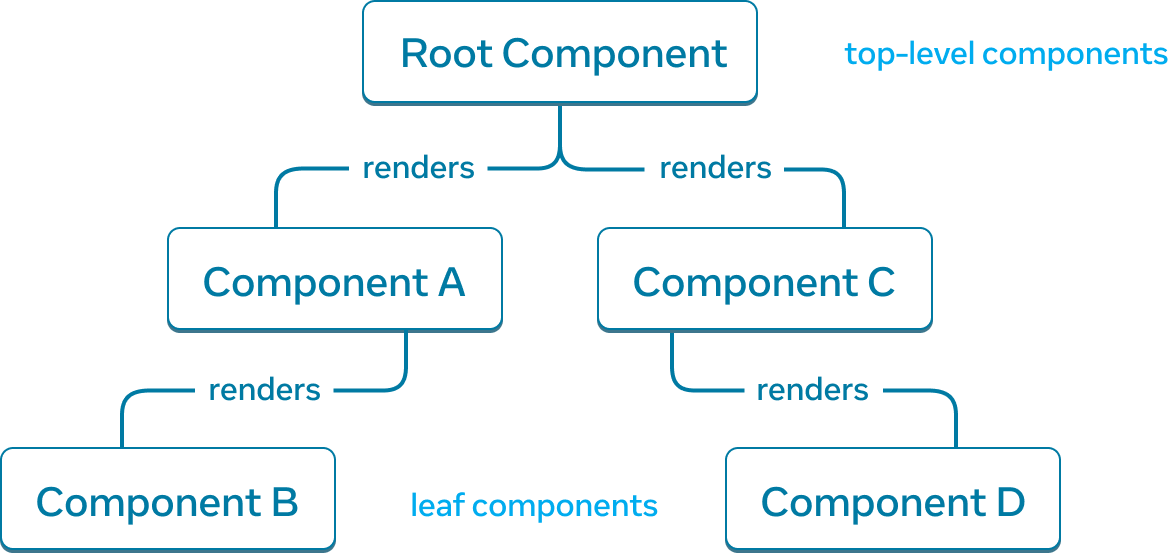
A React render tree is a representation of the parent and child relationship between components.

A tree graph with five nodes, with each node representing a component. The root node is located at the top the tree graph and is labelled 'Root Component'. It has two arrows extending down to two nodes labelled 'Component A' and 'Component C'. Each of the arrows is labelled with 'renders'. 'Component A' has a single 'renders' arrow to a node labelled 'Component B'. 'Component C' has a single 'renders' arrow to a node labelled 'Component D'.

An example React render tree.

Components near the top of the tree, near the root component, are considered top-level components. Components with no child components are leaf components. This categorization of components is useful for understanding data flow and rendering performance.

Modelling the relationship between JavaScript modules is another useful way to understand your app. We refer to it as a module dependency tree.
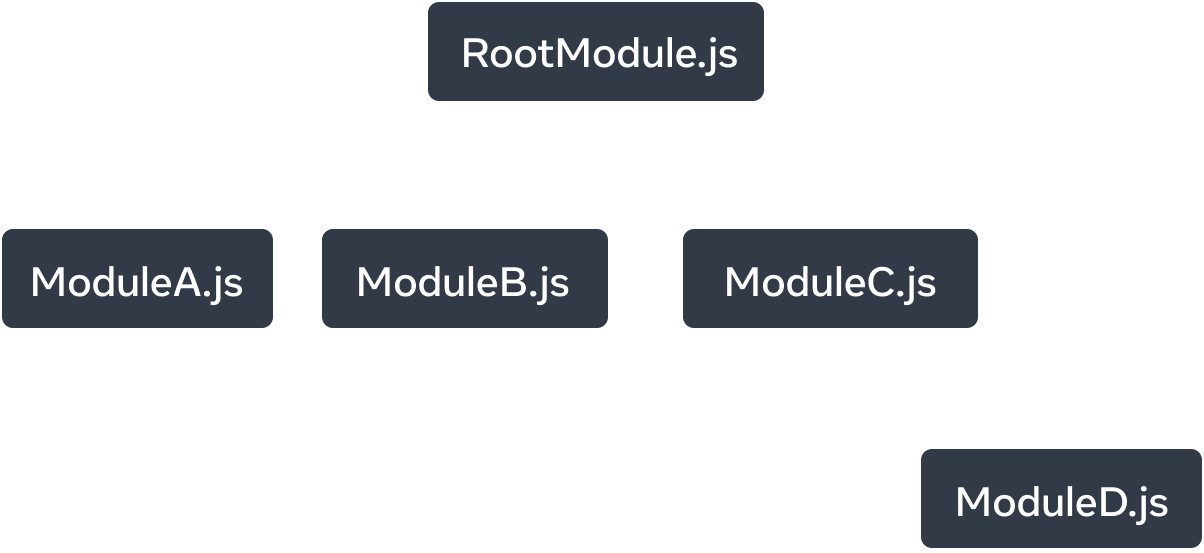
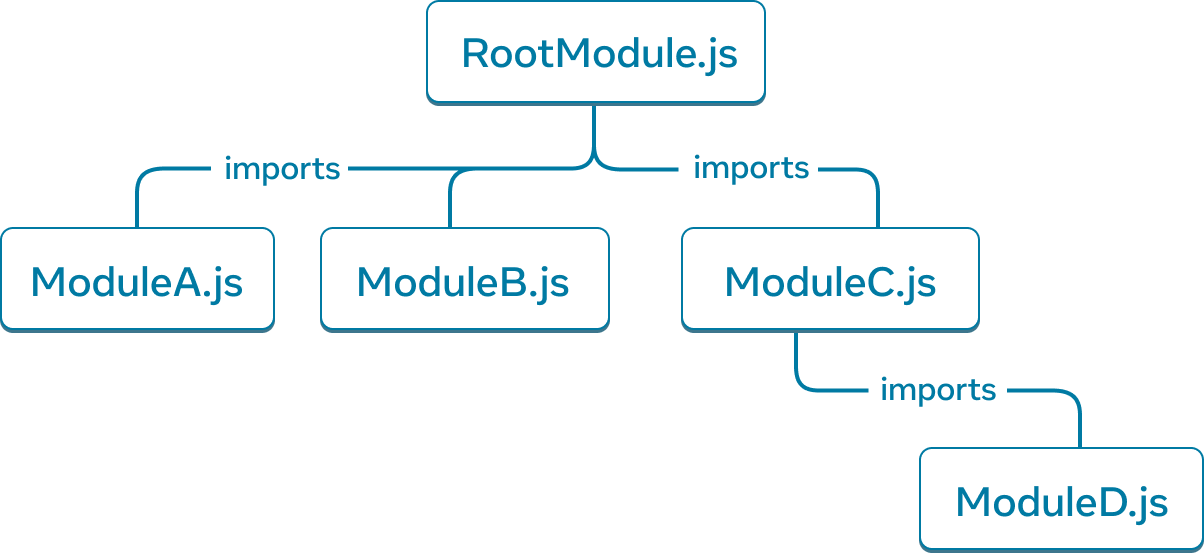
A tree graph with five nodes. Each node represents a JavaScript module. The top-most node is labelled 'RootModule.js'. It has three arrows extending to the nodes: 'ModuleA.js', 'ModuleB.js', and 'ModuleC.js'. Each arrow is labelled as 'imports'. 'ModuleC.js' node has a single 'imports' arrow that points to a node labelled 'ModuleD.js'.

An example module dependency tree.

A dependency tree is often used by build tools to bundle all the relevant JavaScript code for the client to download and render. A large bundle size regresses user experience for React apps. Understanding the module dependency tree is helpful to debug such issues.

Ready to learn this topic?

Read Your UI as a Tree to learn how to create a render and module dependency trees for a React app and how they’re useful mental models for improving user experience and performance.

Read More

What’s next?

Head over to Your First Component to start reading this chapter page by page!

Or, if you’re already familiar with these topics, why not read about Adding Interactivity?


Copyright © Meta Platforms, Inc
no uwu plz
uwu?
Logo by@sawaratsuki1004
Learn React
Quick Start
Installation
Describing the UI
Adding Interactivity
Managing State
Escape Hatches
API Reference
React APIs
React DOM APIs
Community
Code of Conduct
Meet the Team
Docs Contributors
Acknowledgements
More
Blog
React Native
Privacy
Terms
Fork
function Profile() {
  return (
    <img
      src="https://i.imgur.com/MK3eW3As.jpg"
      alt="Katherine Johnson"
    />
  );
}

export default function Gallery() {
  return (
    <section>
      <h1>Amazing scientists</h1>
      <Profile />
      <Profile />
      <Profile />
    </section>
  );
}

Fork
import Profile from './Profile.js';

export default function Gallery() {
  return (
    <section>
      <h1>Amazing scientists</h1>
      <Profile />
      <Profile />
      <Profile />
    </section>
  );
}

Fork
export default function TodoList() {
  return (
    // This doesn't quite work!
    <h1>Hedy Lamarr's Todos</h1>
    <img
      src="https://i.imgur.com/yXOvdOSs.jpg"
      alt="Hedy Lamarr"
      class="photo"
    >
    <ul>
      <li>Invent new traffic lights
      <li>Rehearse a movie scene
      <li>Improve spectrum technology
    </ul>

Fork
export default function TodoList() {
  return (
    <>
      <h1>Hedy Lamarr's Todos</h1>
      <img
        src="https://i.imgur.com/yXOvdOSs.jpg"
        alt="Hedy Lamarr"
        className="photo"
      />
      <ul>
        <li>Invent new traffic lights</li>
        <li>Rehearse a movie scene</li>
        <li>Improve spectrum technology</li>
      </ul>
    </>
  );
}

Fork
const person = {
  name: 'Gregorio Y. Zara',
  theme: {
    backgroundColor: 'black',
    color: 'pink'
  }
};

export default function TodoList() {
  return (
    <div style={person.theme}>
      <h1>{person.name}'s Todos</h1>
      <img
        className="avatar"
        src="https://i.imgur.com/7vQD0fPs.jpg"
        alt="Gregorio Y. Zara"
      />
      <ul>
        <li>Improve the videophone</li>
        <li>Prepare aeronautics lectures</li>
        <li>Work on the alcohol-fuelled engine</li>
      </ul>
    </div>
  );
}

Fork
import { getImageUrl } from './utils.js'

export default function Profile() {
  return (
    <Card>
      <Avatar
        size={100}
        person={{
          name: 'Katsuko Saruhashi',
          imageId: 'YfeOqp2'
        }}
      />
    </Card>
  );
}

function Avatar({ person, size }) {
  return (
    <img
      className="avatar"
      src={getImageUrl(person)}
      alt={person.name}
      width={size}
      height={size}
    />
  );
}

function Card({ children }) {
  return (
    <div className="card">
      {children}
    </div>
  );
}

Fork
function Item({ name, isPacked }) {
  return (
    <li className="item">
      {name} {isPacked && '✅'}
    </li>
  );
}

export default function PackingList() {
  return (
    <section>
      <h1>Sally Ride's Packing List</h1>
      <ul>
        <Item
          isPacked={true}
          name="Space suit"
        />
        <Item
          isPacked={true}
          name="Helmet with a golden leaf"
        />
        <Item
          isPacked={false}
          name="Photo of Tam"
        />
      </ul>
    </section>
  );
}

Fork
import { people } from './data.js';
import { getImageUrl } from './utils.js';

export default function List() {
  const listItems = people.map(person =>
    <li key={person.id}>
      <img
        src={getImageUrl(person)}
        alt={person.name}
      />
      <p>
        <b>{person.name}:</b>
        {' ' + person.profession + ' '}
        known for {person.accomplishment}
      </p>
    </li>
  );
  return (
    <article>
      <h1>Scientists</h1>
      <ul>{listItems}</ul>
    </article>
  );
}

Fork
let guest = 0;

function Cup() {
  // Bad: changing a preexisting variable!
  guest = guest + 1;
  return <h2>Tea cup for guest #{guest}</h2>;
}

export default function TeaSet() {
  return (
    <>
      <Cup />
      <Cup />
      <Cup />
    </>
  );
}

Fork
function Cup({ guest }) {
  return <h2>Tea cup for guest #{guest}</h2>;
}

export default function TeaSet() {
  return (
    <>
      <Cup guest={1} />
      <Cup guest={2} />
      <Cup guest={3} />
    </>
  );
}