logo by @sawaratsuki1004
React
v19.2
Learn
Reference
Community
Blog

Is this page useful?

On this page

  • Overview
  • JSX: Putting markup into JavaScript
  • Converting HTML to JSX
  • The Rules of JSX
  • 1. Return a single root element
  • 2. Close all the tags
  • 3. camelCase all most of the things!
  • Pro-tip: Use a JSX Converter
  • Recap
  • Challenges

    GET STARTED

  • Quick Start
    • Tutorial: Tic-Tac-Toe
    • Thinking in React
  • Installation
    • Creating a React App
    • Build a React App from Scratch
    • Add React to an Existing Project
  • Setup
    • Editor Setup
    • Using TypeScript
    • React Developer Tools
  • React Compiler
    • Introduction
    • Installation
    • Incremental Adoption
    • Debugging and Troubleshooting
  • LEARN REACT

  • Describing the UI
    • Your First Component
    • Importing and Exporting Components
    • Writing Markup with JSX
    • JavaScript in JSX with Curly Braces
    • Passing Props to a Component
    • Conditional Rendering
    • Rendering Lists
    • Keeping Components Pure
    • Your UI as a Tree
  • Adding Interactivity
    • Responding to Events
    • State: A Component's Memory
    • Render and Commit
    • State as a Snapshot
    • Queueing a Series of State Updates
    • Updating Objects in State
    • Updating Arrays in State
  • Managing State
    • Reacting to Input with State
    • Choosing the State Structure
    • Sharing State Between Components
    • Preserving and Resetting State
    • Extracting State Logic into a Reducer
    • Passing Data Deeply with Context
    • Scaling Up with Reducer and Context
  • Escape Hatches
    • Referencing Values with Refs
    • Manipulating the DOM with Refs
    • Synchronizing with Effects
    • You Might Not Need an Effect
    • Lifecycle of Reactive Effects
    • Separating Events from Effects
    • Removing Effect Dependencies
    • Reusing Logic with Custom Hooks
Learn React

Writing Markup with JSX

JSX is a syntax extension for JavaScript that lets you write HTML-like markup inside a JavaScript file. Although there are other ways to write components, most React developers prefer the conciseness of JSX, and most codebases use it.

You will learn

  • Why React mixes markup with rendering logic
  • How JSX is different from HTML
  • How to display information with JSX

JSX: Putting markup into JavaScript

The Web has been built on HTML, CSS, and JavaScript. For many years, web developers kept content in HTML, design in CSS, and logic in JavaScript—often in separate files! Content was marked up inside HTML while the page’s logic lived separately in JavaScript:
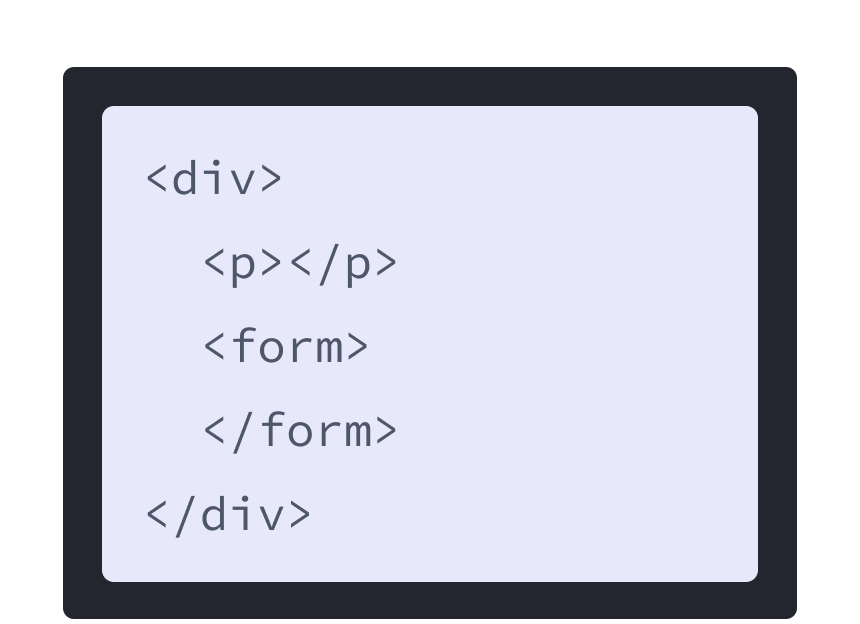
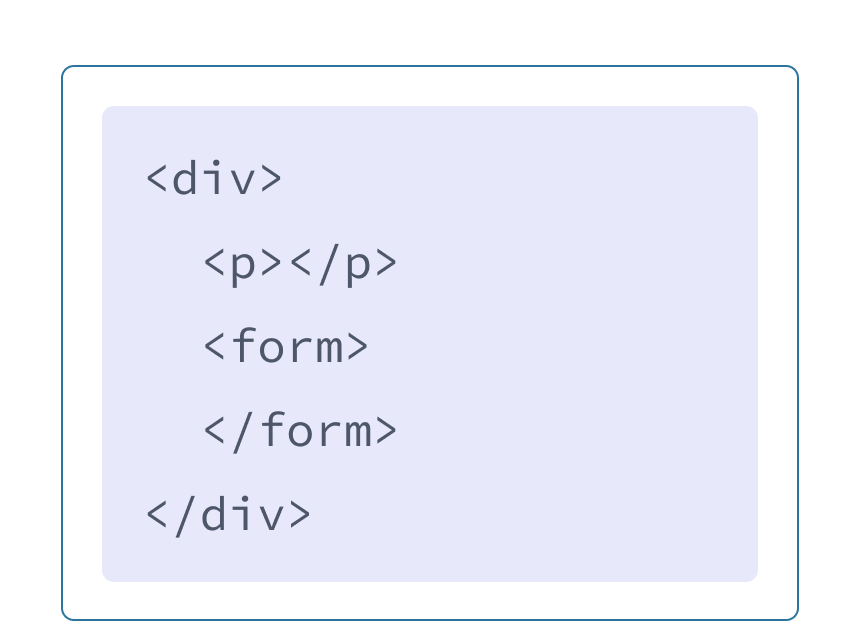
HTML markup with purple background and a div with two child tags: p and form.

HTML

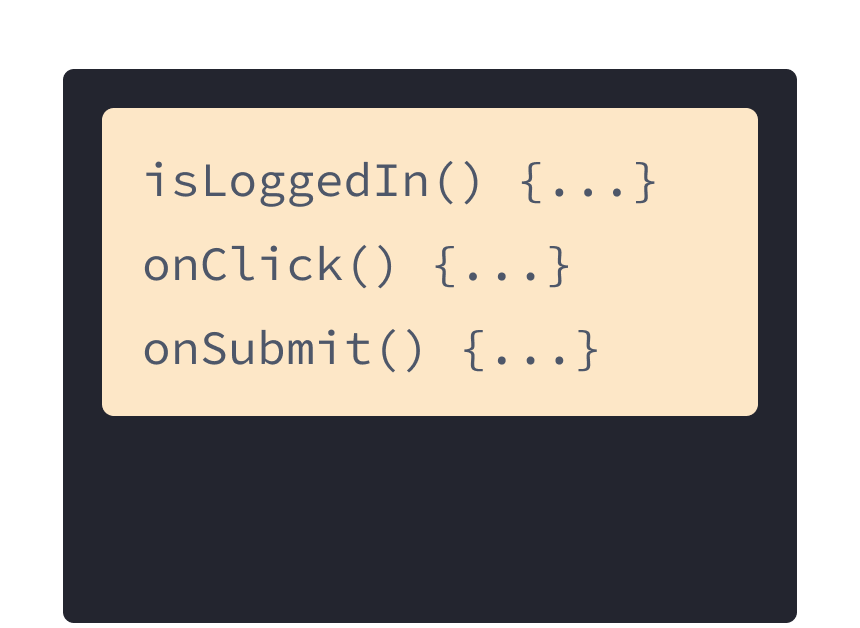
Three JavaScript handlers with yellow background: onSubmit, onLogin, and onClick.

JavaScript

But as the Web became more interactive, logic increasingly determined content. JavaScript was in charge of the HTML! This is why in React, rendering logic and markup live together in the same place—components.
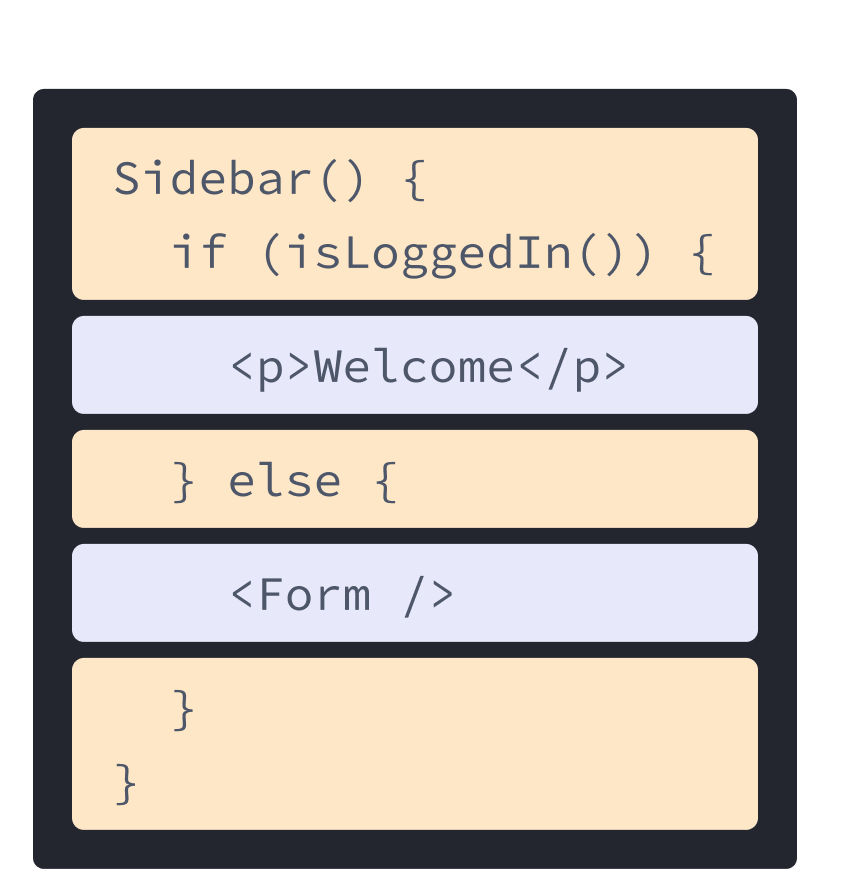
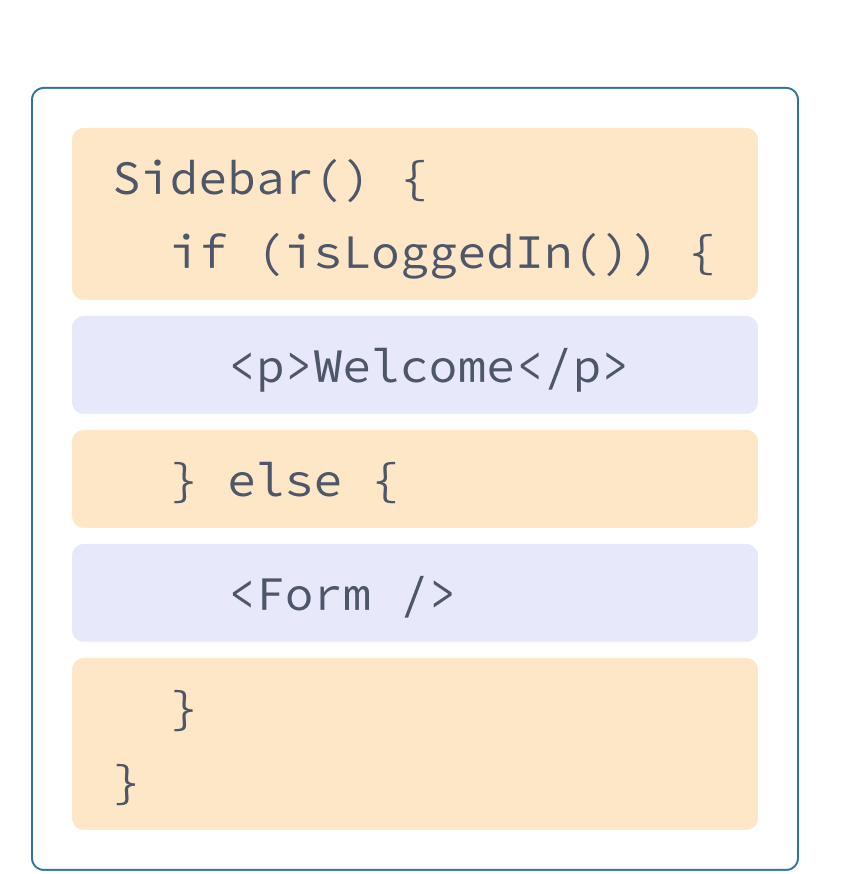
React component with HTML and JavaScript from previous examples mixed. Function name is Sidebar which calls the function isLoggedIn, highlighted in yellow. Nested inside the function highlighted in purple is the p tag from before, and a Form tag referencing the component shown in the next diagram.

Sidebar.js React component

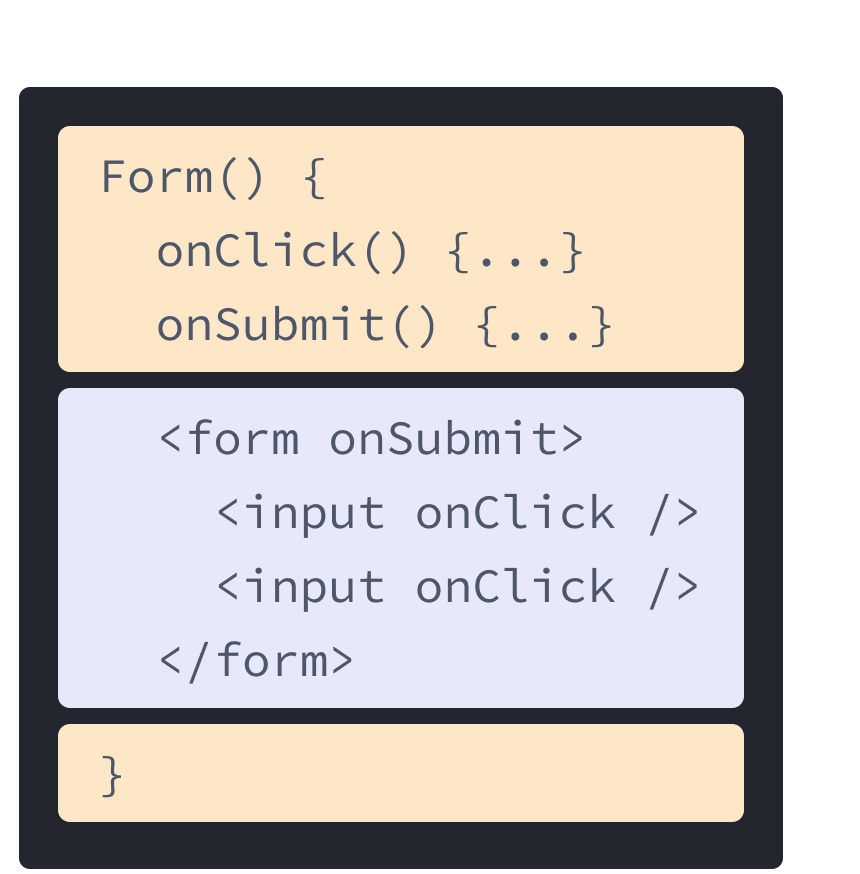
React component with HTML and JavaScript from previous examples mixed. Function name is Form containing two handlers onClick and onSubmit highlighted in yellow. Following the handlers is HTML highlighted in purple. The HTML contains a form element with a nested input element, each with an onClick prop.

Form.js React component

Keeping a button’s rendering logic and markup together ensures that they stay in sync with each other on every edit. Conversely, details that are unrelated, such as the button’s markup and a sidebar’s markup, are isolated from each other, making it safer to change either of them on their own.

Each React component is a JavaScript function that may contain some markup that React renders into the browser. React components use a syntax extension called JSX to represent that markup. JSX looks a lot like HTML, but it is a bit stricter and can display dynamic information. The best way to understand this is to convert some HTML markup to JSX markup.

Note

JSX and React are two separate things. They’re often used together, but you can use them independently of each other. JSX is a syntax extension, while React is a JavaScript library.

Converting HTML to JSX

Suppose that you have some (perfectly valid) HTML:

<h1>Hedy Lamarr's Todos</h1> <img src="https://i.imgur.com/yXOvdOSs.jpg" alt="Hedy Lamarr" class="photo" > <ul> <li>Invent new traffic lights <li>Rehearse a movie scene <li>Improve the spectrum technology </ul>

And you want to put it into your component:

export default function TodoList() { return ( // ??? ) }

If you copy and paste it as is, it will not work:

export default function TodoList() { return ( // This doesn't quite work! <h1>Hedy Lamarr's Todos</h1> <img src="https://i.imgur.com/yXOvdOSs.jpg" alt="Hedy Lamarr" class="photo" > <ul> <li>Invent new traffic lights <li>Rehearse a movie scene <li>Improve the spectrum technology </ul> ); }

This is because JSX is stricter and has a few more rules than HTML! If you read the error messages above, they’ll guide you to fix the markup, or you can follow the guide below.

Note

Most of the time, React’s on-screen error messages will help you find where the problem is. Give them a read if you get stuck!

The Rules of JSX

1. Return a single root element

To return multiple elements from a component, wrap them with a single parent tag.

For example, you can use a <div>:

<div> <h1>Hedy Lamarr's Todos</h1> <img src="https://i.imgur.com/yXOvdOSs.jpg" alt="Hedy Lamarr" class="photo" > <ul> ... </ul> </div>

If you don’t want to add an extra <div> to your markup, you can write <> and </> instead:

<> <h1>Hedy Lamarr's Todos</h1> <img src="https://i.imgur.com/yXOvdOSs.jpg" alt="Hedy Lamarr" class="photo" > <ul> ... </ul> </>

This empty tag is called a Fragment. Fragments let you group things without leaving any trace in the browser HTML tree.

Deep Dive

Why do multiple JSX tags need to be wrapped?

JSX looks like HTML, but under the hood it is transformed into plain JavaScript objects. You can’t return two objects from a function without wrapping them into an array. This explains why you also can’t return two JSX tags without wrapping them into another tag or a Fragment.

2. Close all the tags

JSX requires tags to be explicitly closed: self-closing tags like <img> must become <img />, and wrapping tags like <li>oranges must be written as <li>oranges</li>.

This is how Hedy Lamarr’s image and list items look closed:

<> <img src="https://i.imgur.com/yXOvdOSs.jpg" alt="Hedy Lamarr" class="photo" /> <ul> <li>Invent new traffic lights</li> <li>Rehearse a movie scene</li> <li>Improve the spectrum technology</li> </ul> </>

3. camelCase all most of the things!

JSX turns into JavaScript and attributes written in JSX become keys of JavaScript objects. In your own components, you will often want to read those attributes into variables. But JavaScript has limitations on variable names. For example, their names can’t contain dashes or be reserved words like class.

This is why, in React, many HTML and SVG attributes are written in camelCase. For example, instead of stroke-width you use strokeWidth. Since class is a reserved word, in React you write className instead, named after the corresponding DOM property:

<img src="https://i.imgur.com/yXOvdOSs.jpg" alt="Hedy Lamarr" className="photo" />

You can find all these attributes in the list of DOM component props. If you get one wrong, don’t worry—React will print a message with a possible correction to the browser console.

Pitfall

For historical reasons, aria-* and data-* attributes are written as in HTML with dashes.

Pro-tip: Use a JSX Converter

Converting all these attributes in existing markup can be tedious! We recommend using a converter to translate your existing HTML and SVG to JSX. Converters are very useful in practice, but it’s still worth understanding what is going on so that you can comfortably write JSX on your own.

Here is your final result:

export default function TodoList() { return ( <> <h1>Hedy Lamarr's Todos</h1> <img src="https://i.imgur.com/yXOvdOSs.jpg" alt="Hedy Lamarr" className="photo" /> <ul> <li>Invent new traffic lights</li> <li>Rehearse a movie scene</li> <li>Improve the spectrum technology</li> </ul> </> ); }

Recap

Now you know why JSX exists and how to use it in components:

  • React components group rendering logic together with markup because they are related.
  • JSX is similar to HTML, with a few differences. You can use a converter if you need to.
  • Error messages will often point you in the right direction to fixing your markup.

Try out some challenges

Challenge 1 of 1:
Convert some HTML to JSX

This HTML was pasted into a component, but it’s not valid JSX. Fix it:

export default function Bio() { return ( <div class="intro"> <h1>Welcome to my website!</h1> </div> <p class="summary"> You can find my thoughts here. <br><br> <b>And <i>pictures</b></i> of scientists! </p> ); }

Whether to do it by hand or using the converter is up to you!


Copyright © Meta Platforms, Inc
no uwu plz
uwu?
Logo by@sawaratsuki1004
Learn React
Quick Start
Installation
Describing the UI
Adding Interactivity
Managing State
Escape Hatches
API Reference
React APIs
React DOM APIs
Community
Code of Conduct
Meet the Team
Docs Contributors
Acknowledgements
More
Blog
React Native
Privacy
Terms
<h1>Hedy Lamarr's Todos</h1>
<img
src="https://i.imgur.com/yXOvdOSs.jpg"
alt="Hedy Lamarr"
class="photo"
>
<ul>
<li>Invent new traffic lights
<li>Rehearse a movie scene
<li>Improve the spectrum technology
</ul>
export default function TodoList() {
return (
// ???
)
}
Fork
export default function TodoList() {
  return (
    // This doesn't quite work!
    <h1>Hedy Lamarr's Todos</h1>
    <img 
      src="https://i.imgur.com/yXOvdOSs.jpg" 
      alt="Hedy Lamarr" 
      class="photo"
    >
    <ul>
      <li>Invent new traffic lights
      <li>Rehearse a movie scene
      <li>Improve the spectrum technology
    </ul>

<div>
<h1>Hedy Lamarr's Todos</h1>
<img
src="https://i.imgur.com/yXOvdOSs.jpg"
alt="Hedy Lamarr"
class="photo"
>
<ul>
...
</ul>
</div>
<>
<h1>Hedy Lamarr's Todos</h1>
<img
src="https://i.imgur.com/yXOvdOSs.jpg"
alt="Hedy Lamarr"
class="photo"
>
<ul>
...
</ul>
</>
<>
<img
src="https://i.imgur.com/yXOvdOSs.jpg"
alt="Hedy Lamarr"
class="photo"
/>
<ul>
<li>Invent new traffic lights</li>
<li>Rehearse a movie scene</li>
<li>Improve the spectrum technology</li>
</ul>
</>
<img
src="https://i.imgur.com/yXOvdOSs.jpg"
alt="Hedy Lamarr"
className="photo"
/>
Fork
export default function TodoList() {
  return (
    <>
      <h1>Hedy Lamarr's Todos</h1>
      <img 
        src="https://i.imgur.com/yXOvdOSs.jpg" 
        alt="Hedy Lamarr" 
        className="photo" 
      />
      <ul>
        <li>Invent new traffic lights</li>
        <li>Rehearse a movie scene</li>
        <li>Improve the spectrum technology</li>
      </ul>
    </>
  );
}

Fork
export default function Bio() {
  return (
    <div class="intro">
      <h1>Welcome to my website!</h1>
    </div>
    <p class="summary">
      You can find my thoughts here.
      <br><br>
      <b>And <i>pictures</b></i> of scientists!
    </p>
  );
}