logo by @sawaratsuki1004
React
v19.2
Learn
Reference
Community
Blog

Is this page useful?

On this page

  • Overview
  • Reference
  • useDebugValue(value, format?)
  • Usage
  • Adding a label to a custom Hook
  • Deferring formatting of a debug value

    react@19.2

  • Overview
  • Hooks
    • useActionState
    • useCallback
    • useContext
    • useDebugValue
    • useDeferredValue
    • useEffect
    • useEffectEvent
    • useId
    • useImperativeHandle
    • useInsertionEffect
    • useLayoutEffect
    • useMemo
    • useOptimistic
    • useReducer
    • useRef
    • useState
    • useSyncExternalStore
    • useTransition
  • Components
    • <Fragment> (<>)
    • <Profiler>
    • <StrictMode>
    • <Suspense>
    • <Activity>
    • <ViewTransition> - This feature is available in the latest Canary version of React
  • APIs
    • act
    • addTransitionType - This feature is available in the latest Canary version of React
    • cache
    • cacheSignal
    • captureOwnerStack
    • createContext
    • lazy
    • memo
    • startTransition
    • use
    • experimental_taintObjectReference - This feature is available in the latest Experimental version of React
    • experimental_taintUniqueValue - This feature is available in the latest Experimental version of React
  • react-dom@19.2

  • Hooks
    • useFormStatus
  • Components
    • Common (e.g. <div>)
    • <form>
    • <input>
    • <option>
    • <progress>
    • <select>
    • <textarea>
    • <link>
    • <meta>
    • <script>
    • <style>
    • <title>
  • APIs
    • createPortal
    • flushSync
    • preconnect
    • prefetchDNS
    • preinit
    • preinitModule
    • preload
    • preloadModule
  • Client APIs
    • createRoot
    • hydrateRoot
  • Server APIs
    • renderToPipeableStream
    • renderToReadableStream
    • renderToStaticMarkup
    • renderToString
    • resume
    • resumeToPipeableStream
  • Static APIs
    • prerender
    • prerenderToNodeStream
    • resumeAndPrerender
    • resumeAndPrerenderToNodeStream
  • React Compiler

  • Configuration
    • compilationMode
    • gating
    • logger
    • panicThreshold
    • target
  • Directives
    • "use memo"
    • "use no memo"
  • Compiling Libraries
  • React DevTools

  • React Performance tracks
  • eslint-plugin-react-hooks

  • Lints
    • exhaustive-deps
    • rules-of-hooks
    • component-hook-factories
    • config
    • error-boundaries
    • gating
    • globals
    • immutability
    • incompatible-library
    • preserve-manual-memoization
    • purity
    • refs
    • set-state-in-effect
    • set-state-in-render
    • static-components
    • unsupported-syntax
    • use-memo
  • Rules of React

  • Overview
    • Components and Hooks must be pure
    • React calls Components and Hooks
    • Rules of Hooks
  • React Server Components

  • Server Components
  • Server Functions
  • Directives
    • 'use client'
    • 'use server'
  • Legacy APIs

  • Legacy React APIs
    • Children
    • cloneElement
    • Component
    • createElement
    • createRef
    • forwardRef
    • isValidElement
    • PureComponent
API Reference

useDebugValue

useDebugValue is a React Hook that lets you add a label to a custom Hook in React DevTools.

useDebugValue(value, format?)

  • Reference
    • useDebugValue(value, format?)
  • Usage
    • Adding a label to a custom Hook
    • Deferring formatting of a debug value

Reference

useDebugValue(value, format?)

Call useDebugValue at the top level of your custom Hook to display a readable debug value:

import { useDebugValue } from 'react'; function useOnlineStatus() { // ... useDebugValue(isOnline ? 'Online' : 'Offline'); // ... }

See more examples below.

Parameters

  • value: The value you want to display in React DevTools. It can have any type.
  • optional format: A formatting function. When the component is inspected, React DevTools will call the formatting function with the value as the argument, and then display the returned formatted value (which may have any type). If you don’t specify the formatting function, the original value itself will be displayed.

Returns

useDebugValue does not return anything.

Usage

Adding a label to a custom Hook

Call useDebugValue at the top level of your custom Hook to display a readable debug value for React DevTools.

import { useDebugValue } from 'react'; function useOnlineStatus() { // ... useDebugValue(isOnline ? 'Online' : 'Offline'); // ... }

This gives components calling useOnlineStatus a label like OnlineStatus: "Online" when you inspect them:
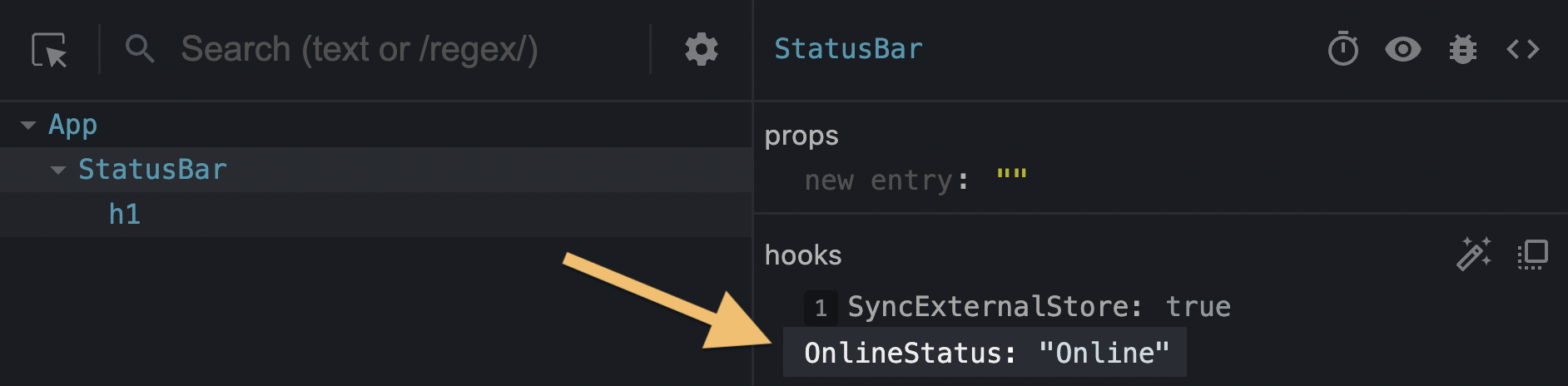
A screenshot of React DevTools showing the debug value

Without the useDebugValue call, only the underlying data (in this example, true) would be displayed.

import { useSyncExternalStore, useDebugValue } from 'react'; export function useOnlineStatus() { const isOnline = useSyncExternalStore(subscribe, () => navigator.onLine, () => true); useDebugValue(isOnline ? 'Online' : 'Offline'); return isOnline; } function subscribe(callback) { window.addEventListener('online', callback); window.addEventListener('offline', callback); return () => { window.removeEventListener('online', callback); window.removeEventListener('offline', callback); }; }

Note

Don’t add debug values to every custom Hook. It’s most valuable for custom Hooks that are part of shared libraries and that have a complex internal data structure that’s difficult to inspect.


Deferring formatting of a debug value

You can also pass a formatting function as the second argument to useDebugValue:

useDebugValue(date, date => date.toDateString());

Your formatting function will receive the debug value as a parameter and should return a formatted display value. When your component is inspected, React DevTools will call this function and display its result.

This lets you avoid running potentially expensive formatting logic unless the component is actually inspected. For example, if date is a Date value, this avoids calling toDateString() on it for every render.


Copyright © Meta Platforms, Inc
no uwu plz
uwu?
Logo by@sawaratsuki1004
Learn React
Quick Start
Installation
Describing the UI
Adding Interactivity
Managing State
Escape Hatches
API Reference
React APIs
React DOM APIs
Community
Code of Conduct
Meet the Team
Docs Contributors
Acknowledgements
More
Blog
React Native
Privacy
Terms
useDebugValue(value, format?)
import { useDebugValue } from 'react';

function useOnlineStatus() {
// ...
useDebugValue(isOnline ? 'Online' : 'Offline');
// ...
}
import { useDebugValue } from 'react';

function useOnlineStatus() {
// ...
useDebugValue(isOnline ? 'Online' : 'Offline');
// ...
}
Fork
import { useSyncExternalStore, useDebugValue } from 'react';

export function useOnlineStatus() {
  const isOnline = useSyncExternalStore(subscribe, () => navigator.onLine, () => true);
  useDebugValue(isOnline ? 'Online' : 'Offline');
  return isOnline;
}

function subscribe(callback) {
  window.addEventListener('online', callback);
  window.addEventListener('offline', callback);
  return () => {
    window.removeEventListener('online', callback);
    window.removeEventListener('offline', callback);
  };
}

useDebugValue(date, date => date.toDateString());